rootsign verify on the result. Then you break the record on purpose, twice, to see how RootSign reports an edited record and a missing one.
Nothing here needs a database, Docker, an API key or a network connection. Records go to a local JSONL file.

Install, record three tool calls, verify the chain
Prerequisites
- Python 3.11 or 3.12. See supported versions.
- A virtual environment is recommended, so the
rootsigncommand lands on your path.
1
Install RootSign
2
Instrument two tools
Save this as
agent.py. The three numbered lines are the only RootSign code; everything else is an ordinary async program.agent.py
3
Run it
~/.rootsign/sessions/<session_id>.jsonl, one JSON object per line: the session opening, one line per tool call, and the session closing.4
Verify the chain
Replace the ID with the one your script printed:The exit code is
0.5
Edit a record and verify again
Make a copy of the session file, then open the copy in an editor. Line 2 is the first tool call. Change the amount The exit code is
1500.0 to 15000.0 on that line, save, and verify the copy:1. The verifier names the record that broke and why: the stored arguments no longer match the hash recorded when the tool ran.6
Delete a record and verify again
Make a fresh copy, delete line 2 (the first tool call) entirely, and verify:The exit code is
2. A script can tell an edited record (exit 1) from a missing one (exit 2), which matters in an investigation: an edit points to tampering, a gap may be a lost upload.The verifier cannot detect a record deleted from the end of a session, because the chain alone does not say how long it was meant to be. How it works lists this and the other limits.
Hand the session to someone else
verify answers a developer’s question. To give the same session to a reviewer, export it as an evidence bundle:
report.html in a browser. It shows the verdict first, then the chain, then every field of every event.
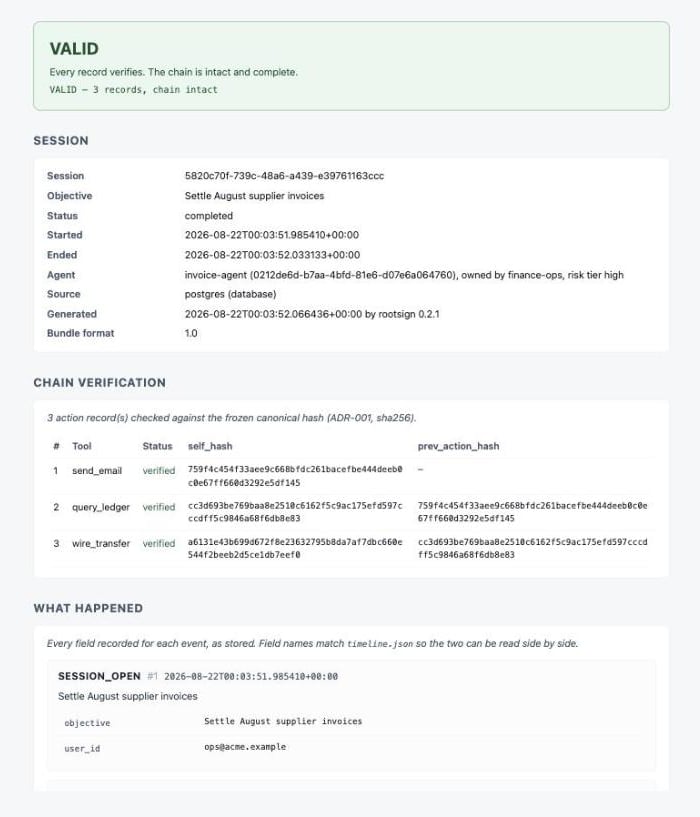
report.html from an evidence bundle
Where the data lives
Both are plain text. To keep records somewhere else, such as next to your project, set
ROOTSIGN_DATA_DIR:
Next steps
How it works
What a record contains, what the hash covers, and what each verdict means.
Verify in CI or cron
Exit codes, a script that checks every session, and the Python API.
Export an evidence bundle
Hand a session to a reviewer and prove later it was not changed.
Instrument your framework
LangGraph, CrewAI, MCP, or any Python function.