rootsign verify answers a developer’s question. A compliance officer, an auditor or a customer’s security team asks a different one, what the agent did and whether they can trust the file, and they will not read JSONL. rootsign export turns one session into a folder they can open: a report in HTML and Markdown, the same facts as JSON, and a manifest with a SHA-256 for every file.
Exporting a JSONL session file needs only
pip install rootsign. Exporting by session ID reads the PostgreSQL store and needs pip install 'rootsign[postgres]' and ROOTSIGN_BACKEND=postgres.Export a session
1
Run export
--out, the bundle is written to the current directory.2
Record the manifest hash outside the bundle
Copy the
manifest.json SHA-256 line into the ticket, email or log where you record the hand-over. This value is what later proves a bundle is the one you exported. The checking section shows why it has to live somewhere else.Each export has its own manifest hash, because the manifest records when the bundle was generated. Exporting the same session again produces a different hash, so record the one printed for the bundle you actually send.3
Send the folder
Send the whole
evidence-<session_id> folder. The reviewer opens report.html in any browser. It has no JavaScript and makes no network requests, so it opens the same from a file share, an email attachment or an offline machine.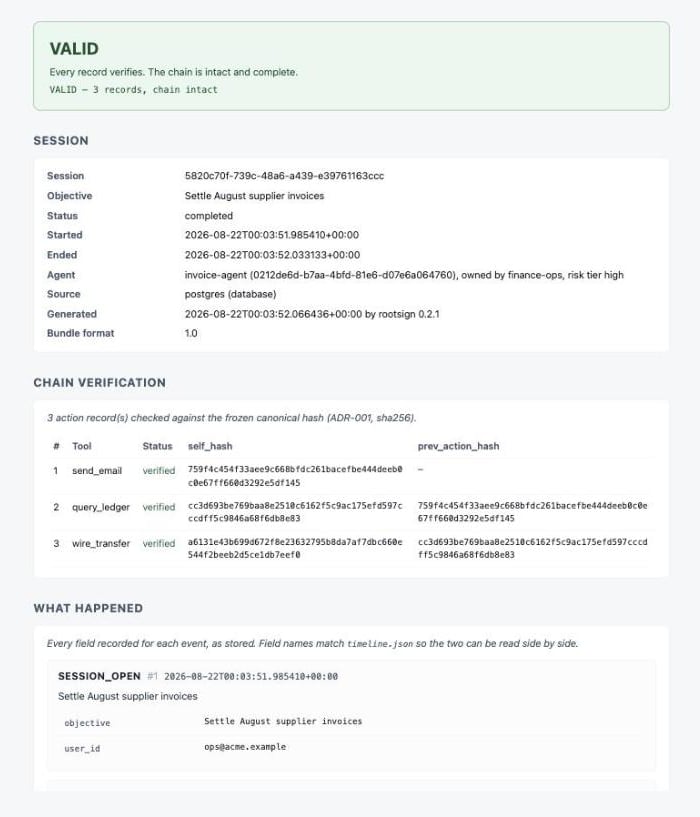
report.html: the verdict first, then the chain, then what happened
What the bundle contains
The reports are built from the three JSON documents and nothing else, so the report cannot state anything the machine-readable evidence does not contain. When a session includes a human approval, the report shows the approval next to the action it decided:
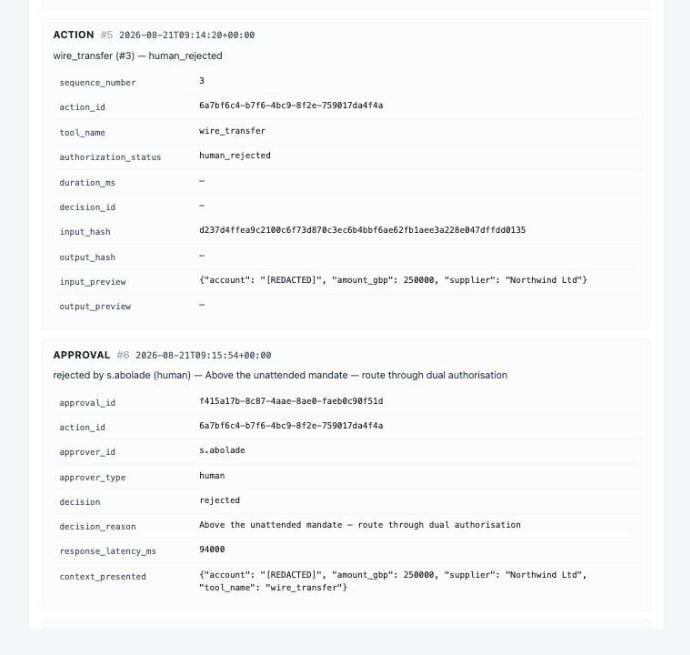
An action a person rejected, and the approval record that rejected it
Check a bundle you receive
Run--check on the folder. It hashes every file again, compares each with the manifest, and prints the manifest’s own hash:
--check names it and exits 1:
Withhold stored content before sharing
When a bundle leaves your organisation,--redact-previews leaves out the stored content of the session: the tool arguments and results, the context a person saw when approving, and captured decision summaries.
report.md:
report.md
--redact-previews withholds content at export time; to keep personal data out of the stored records in the first place, redact it before it is hashed.
Other options
Exit codes
When
rootsign export cannot read the session (a path that does not exist, an unknown session ID) or the bundle folder already exists, it prints one line starting with Error: and exits 1.
Related
Verify a session
Check a session’s chain and read the exit codes.
How it works
What the hashes cover and what verification cannot detect.